
🔴 Status: Challenge Ended
The banner on the page said registrations were open till 8 October, and the challenge window was 9 to 18 October 2026. When I checked on 20 October 2026, HackerEarth showed “This challenge has ended”. This guide stays live for reference. Last checked: 20 October 2026.
Godrej Capital Pride in Tech Hackathon 2026: What It Was
Hello friends, if you are a fresher who likes building things with code, you probably saw the Pride in Tech hackathon by Godrej Capital this month. It ran on HackerEarth, and unlike most college hackathons, it was also a hiring route. Godrej Capital says that top performers who complete the selection process can get a full-time offer in its Technology team.
One honest note before we start: the challenge is already over, so I am not asking you to apply. I wrote this guide for two reasons. First, so you understand how the whole process worked and are ready if Godrej Capital or another company runs something similar. Second, because I created a HackerEarth account myself and took screenshots of every sign-up screen, so you can see exactly what to expect. I could not register for the challenge or take the test, because it had already ended. Everything about the test itself comes from HackerEarth’s official instructions, and I will tell you each time.
Key Details at a Glance
| Organiser | Godrej Capital, hosted on HackerEarth |
| Challenge name | Pride In Tech by Godrej Capital |
| Meant for | Tech talent from the LGBTQ+ community, 2025, 2026 and 2027 pass-outs |
| Degrees preferred | B.Tech, M.Tech, MSc, Integrated (B.Tech + M.Tech) |
| Registration | Open till 8 October (closed) |
| Challenge window | 9 to 18 October 2026, 7:00 PM to 11:59 PM IST |
| Duration | 2 hours |
| Webcam | Required |
| Mode | Online, on a laptop or desktop |
| Registrations shown | 8.3K (on 20 October 2026) |
| Fee | None mentioned on the page |
What Godrej Capital Wanted
The page says the hackathon is meant to give LGBTQ+ tech talent a place to show their skills, solve real problems and build a career in technology in the BFSI industry. BFSI simply means banking, financial services and insurance. Participants were expected to use ideas like AI, cloud and data analytics in a creative way.
In the “What are we looking for” section, the company lists passion for technology, the ability to turn ideas into practical solutions, a hands-on approach to coding, curiosity about how technology can change the finance world, and a wish to build a long-term career in tech. In plain words, they wanted people who build things, not people who only memorise answers.
Who Could Apply
Candidates who passed out in 2025, 2026 or 2027 could apply. The page says B.Tech, M.Tech, MSc or an integrated B.Tech + M.Tech degree is preferred. Notice the word “preferred”. The page does not say other degrees were rejected, but it also does not explain what happens to them, so if your degree is different, treat it as a risk and read the Instructions tab on the official page carefully.
The hackathon is for tech talent from the LGBTQ+ community, which is the whole purpose of the event. If a similar challenge comes again, read the official page fully before you register.
APPLY ONLINE LINK
The Selection Journey, Stage by Stage
The page shows the journey in one line: Registration, Aptitude Assessment, Online Interviews, Offline Coding Challenge and Interview, Final Selection, and then a full-time opportunity at Godrej Capital. Registration is the sign-up we will go through below. The Aptitude Assessment is most likely the 2-hour HackerEarth test, since it is the only test the page describes, but the page does not label it directly. After that come online interviews, then an offline coding challenge with an interview, and then the final selection.
Here is the important part. The page only gives the names of these stages. It does not tell us the dates of the later rounds, how many interviews there are, what the cut-off is, or where the offline round happens. If someone on Telegram or YouTube gives you exact details about those, they are guessing.
Skills the Page Asks For
Under “Good to have skills”, the page lists core coding skills, working knowledge of web development with NodeJS and ReactJS, building reusable components and front-end libraries, turning designs and wireframes into good code, building responsive web apps with Material UI, Bootstrap, CSS3 and HTML5, and knowledge of Redux as a plus.
Some of these words sound heavy, but they are simple. A reusable component means you write something like a job card once and use it in many places. A wireframe is a rough drawing of a page, and your job is to turn it into real code. Redux is a way to keep your app’s data in one place so every part of the app can read it.
My suggestion, not the page’s: build one small job-listing app in React. Make a reusable card component, add a search box, style it with Material UI so it looks good on a phone, and later add Redux for the saved jobs. That single project touches almost everything on the list, and you can put it on your resume.
How to Sign Up on HackerEarth (With Screenshots)
These are the real screens I saw on 20 October 2026. The steps are the same for any HackerEarth challenge, so they will help you next time too.
Step 1: Open the challenge page
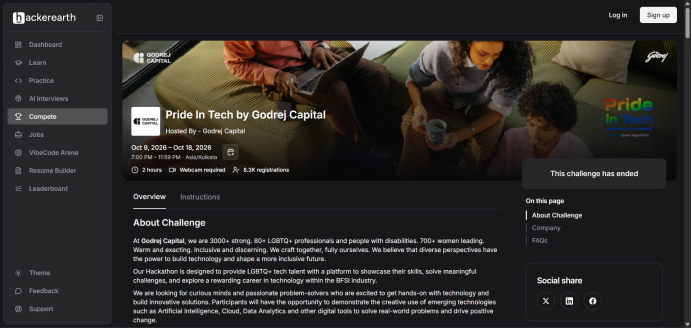
Open the challenge link and you will see the challenge name, the host, the dates, the 2-hour duration, “Webcam required” and the number of registrations. At the top right you will see two buttons, Log in and Sign up.
Step 2: Click Sign up and fill in the form
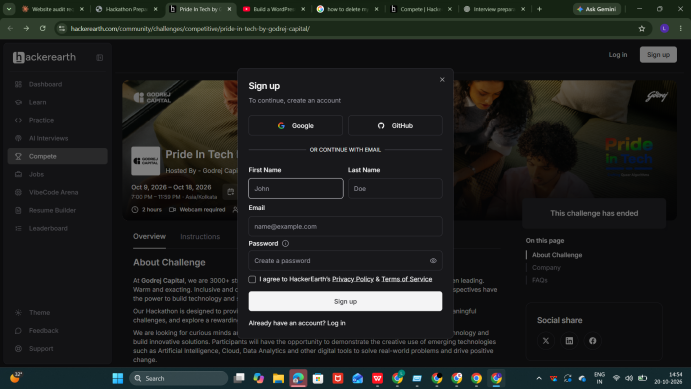
A small box opens. You can continue with Google or GitHub, or use your email. If you choose email, type your first name, last name and email, create a password, tick the box that says you agree to HackerEarth’s Privacy Policy and Terms of Service, and press Sign up. If you already have an account, use Log in instead. Use an email you check every day, because the verification mail and reminders come there.
Step 3: Verify your email
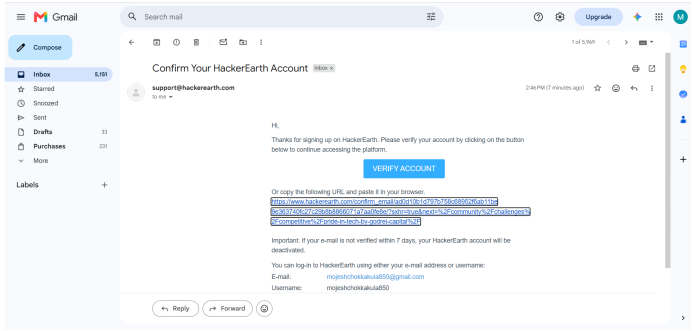
HackerEarth sends a mail called “Confirm Your HackerEarth Account” from support@hackerearth.com. Open it and click the blue Verify Account button. If the button does not work, copy the long link under it and paste it into your browser. The mail also warns that if you do not verify within 7 days, your HackerEarth account will be deactivated. If you cannot find the mail, check your spam folder.
Step 4: Register for the challenge
After you verify, the link takes you back to the challenge page. Register there. HackerEarth says you will get a reminder email 3 hours before the challenge starts, but only if you registered. When I took my screenshot, the place where the register button would be said “This challenge has ended”, so I cannot show you that exact button.
Step 5: Join on the day
HackerEarth’s FAQ says to visit the challenge page at the start time and click “Participate in Challenge”. Registering is not enough on its own, you must come back at the right time.

What the Test Looks Like (From HackerEarth’s Official Instructions)
The test is online, and you must use a laptop or desktop. HackerEarth says it does not support mobile phones for challenges, and this challenge also needed a webcam. The questions come in three types. Programming problems, where you write code in an online editor and submit it. You can submit many times, and the platform counts your best submission. Multiple choice questions, where you pick the right answer. And subjective problems, where you type your answer in a text box. The languages you can use are mentioned in the challenge details.
The rules are strict. The timer cannot be paused, and you must finish in one attempt. Do not close the test tab before you submit your final answers. Use a stable internet connection, and HackerEarth says tethering through a mobile phone is not advised. It also recommends using an incognito or private window so that browser extensions do not disturb the test. Some tests have timed sections, and once that time is over, you cannot go back to that section.
If your computer or internet fails, you will not lose the answers you already submitted. They are saved on HackerEarth’s servers, and you can log in again and continue. The timer keeps running, though, so check your setup before you start. HackerEarth also offers a sample challenge, and it recommends trying it first to learn the editor and the judge.
How the HackerEarth Judge Checks Your Code
Every programming problem has two buttons. Compile and Run tests your code only against the sample input and output shown in the problem. Submit checks your code against many hidden test cases. Four things are checked: the time limit (if you are too slow you get Time Limit Exceeded), the memory limit (Memory Limit Exceeded), runtime errors, and whether the answer is correct (if not, Wrong Answer).
Think of a simple example. A problem asks for the sum of a list of numbers. Your code may give the right answer for the sample with 5 numbers, but fail a hidden test with 100,000 numbers because it is too slow, or crash on an empty list. That is why passing the sample does not mean you will get full marks.
The judge is a machine, not a person. Your output must match the expected output exactly, so print only what the problem asks for, in the format it asks for, without extra words or debug lines. One more thing from HackerEarth’s FAQ: Time Limit Exceeded does not mean your code is correct but slow. It only means it did not finish in time, so nobody can say whether it was correct. And if you write in C or C++, do not use Turbo C++ or conio.h, because code that works there often does not compile on the judge.
Runtime Errors You May See
SIGSEGV means your program tried to read or write memory outside what it was given, for example by using an array index that does not exist. SIGXFSZ means output limit exceeded, which happens when your program prints too much. SIGFPE appears when you divide by zero or take the square root of a negative number. NZEC means your program ended with a non-zero exit code. HackerEarth says that in C or C++ this can mean you forgot “return 0” at the end, and in Python it usually means the program crashed with an unhandled error. MLE means you used more memory than allowed, usually because of a very large array.
HackerEarth also gives a few safe habits. Do not use variables you have not set a value for. Check every place where you read an array element and make sure the index cannot go out of range. Do not declare huge memory, because 64 MB is guaranteed and an array of size 100000 x 100000 will never work. Declare large arrays globally, outside functions.
A Simple Preparation Plan (My Suggestion)
Start with the sample challenge so the editor and the judge feel familiar. Then spend a week solving easy and medium problems on arrays, strings, sorting and hashing with a timer running, and after every problem ask yourself what would break it: an empty input, one item, or a very large input. At the same time, build the small React project from earlier, so you have something real to talk about in an interview.
The page does not list the topics for the multiple choice questions, so revise the basics you studied in college, like programming fundamentals, data structures, DBMS, operating systems and networks. For subjective answers, practise writing a clear answer in five or six simple sentences. This part is my own advice, not an official list.
The day before, charge your laptop, test your webcam, sit near your router, close other tabs, and choose a quiet room with a plain background.
Common Mistakes to Avoid
The most common one is trusting Compile and Run and skipping the edge cases. Others are printing extra text, reading the problem too fast, spending an hour on one problem and ignoring the multiple choice questions, and starting the test without checking the webcam and internet. Please also stay away from groups that promise “leaked questions” or paid selection. HackerEarth says it takes cheating and plagiarism very seriously, and nobody can guarantee you a job.
What If You Missed It?
The challenge is over, so keep an eye on the Compete section of HackerEarth and on Godrej Capital’s official careers page. I cannot promise that Godrej Capital will run this hackathon again, and nobody else can promise it either. Meanwhile, the same preparation works for other company hackathons, and a good React project helps you in every fresher interview.
Frequently Asked Questions
Where can I find the official apply link?
We provide the direct official portal link at the end of our summary table for verified access.
Does LCJP Job Hub charge any placement fees?
No, LCJP Job Hub is completely free and only shares verified educational updates.
Can I still register?
No. The challenge has ended and HackerEarth shows “This challenge has ended”.
Did it guarantee a job?
No. The page says top performers who successfully complete the selection process will have the opportunity to receive a full-time offer. An opportunity is not a guarantee.
Was there any fee?
No fee is mentioned on the page. LCJP Job Hub never asks anyone for money, and you should not pay anyone for selection.
Can I take the test on my phone?
No. HackerEarth says to use a laptop or desktop.
What if my internet disconnects during the test?
Your submitted answers are saved and you can log in again, but the timer keeps running.
Information Verification
| Source | HackerEarth challenge page for Pride In Tech by Godrej Capital |
| Last checked | 20 October 2026 |
| Status | Ended |
| What I did myself | Created and verified a HackerEarth account (screenshots above) |
| What I did not do | Register for the challenge or take the test, because it had ended |
Update History
20 October 2026: Article rewritten using the official page, sign-up screenshots, the test format and judge explanation. Status changed to Ended.
Disclaimer
LCJP Job Hub is an independent website and is not connected to Godrej Capital or HackerEarth. This article is for information only. Dates, rules and selection steps can change, so please check the official HackerEarth challenge page before you take any action. We do not guarantee selection, interview calls or a job offer.
Final thoughts
Final thoughts
The Godrej Capital Pride in Tech Hackathon 2026 has ended, but the skills covered in this guide remain useful for future opportunities. Focus on coding fundamentals, practise solving problems on HackerEarth, and build a small React project to demonstrate your skills. Keep checking official career pages for new opportunities, and always verify eligibility and deadlines before applying.
Register early, try the sample challenge, plan your test environment, and give yourself a few focused days of practice. Good luck!
ALSO READ
The Interview Mistake I Made as a Fresher — And How I Fixed It (My Real Experience)
Resume Preparation for Freshers: A Complete Guide with Real Interview Examples